1win App in India: Android APK and Login
We checked 1win's Android app and mobile site ourselves.
The 1win app for Android is an APK file, 1win.apk, that you download from 1win's own site and install yourself; on 21 October 2026 the file was 5.25 MB. On an iPhone, 1win's own Install app sheet shows how to add its site to your home screen, and a search of India's App Store for 1win that day showed no 1win app.

Choose your route
Choose your route
| Route | What it is | Where to start |
|---|---|---|
| Android app | The 1win.apk file from 1win's own site | Android steps |
| iPhone | 1win's site, added to the home screen in Safari | iPhone and the mobile site |
| Mobile site | 1win's site in your phone's browser, with nothing to install | iPhone and the mobile site |
For deposits, withdrawals and bonus rules, read our 1win review.
Before you install: two checks
Use 1win's own file. Get 1win.apk from the Install app sheet on 1win's own site. Skip APK files from other sites and files sent in chats.
Guard your phone and your codes. An app that asks for your contacts or SMS without a clear reason is a red flag. Never send anyone a one-time code from your bank, UPI or 1win.
1win APK download for Android
The Download Android app button in step 1 gets 1win.apk from 1win's own site. 1win's footer offers 200 Points for installing the app.
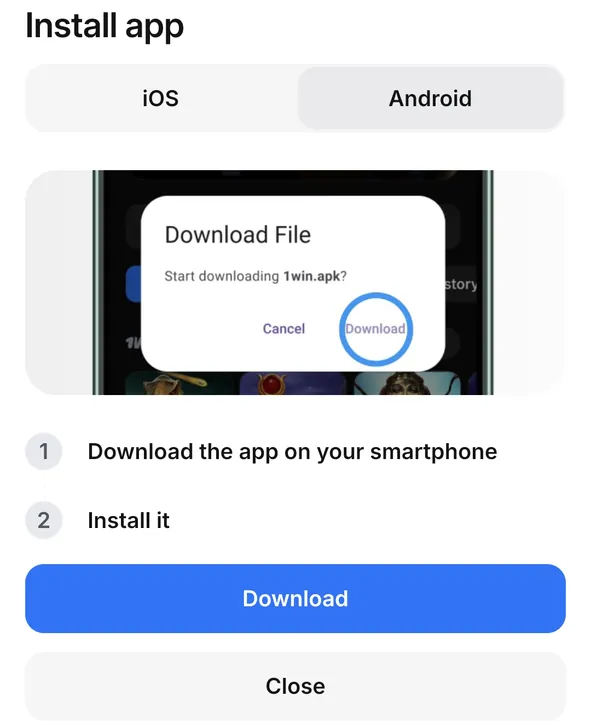
- Tap Download Android app to get 1win.apk from 1win's site. Download Android app
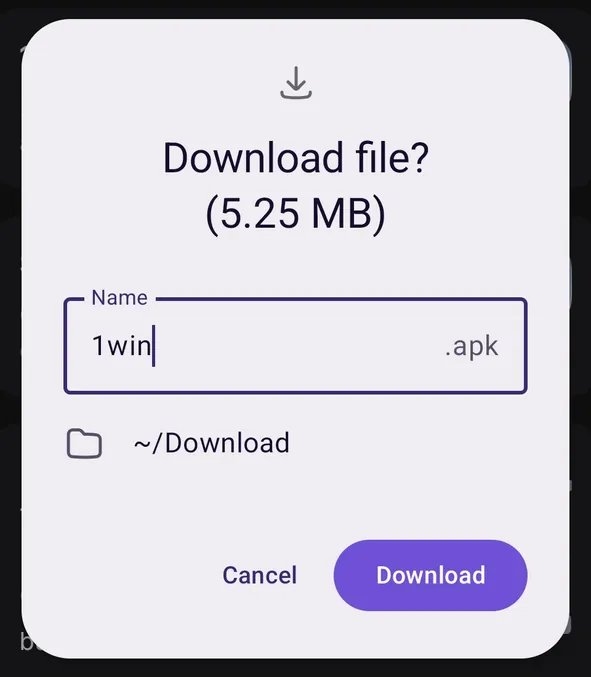
- Your browser asks whether to download 1win.apk. On 21 October it showed the file as 5.25 MB. Tap Download.
- Open the file from your downloads.
- If Android blocks the install, open "Install unknown apps" in Settings and allow only the browser you downloaded with. On Android 8.0 and later this permission is given one app at a time.
- Tap Install, then open 1win and log in.
1win's own sheet sums it up in two steps: download the app on your smartphone, then install it.
iPhone and the mobile site
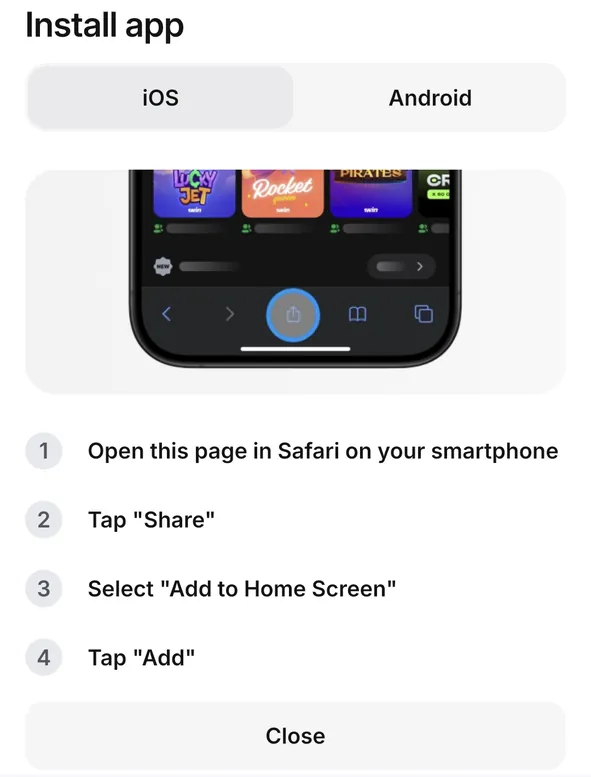
On an iPhone, open 1win's mobile site. It needs nothing installed. The iOS tab of 1win's Install app sheet gives four steps to keep the site on your home screen:
- Open the page in Safari on your iPhone.
- Tap Share.
- Select "Add to Home Screen".
- Tap Add.
This shortcut opens the website. It is not an App Store app.
Sign up and log in
1win's sign-up form asks for a phone number (+91 for India), an e-mail address and a password, with Indian rupees (INR) as the currency and an Add promo code link. 1win's terms also ask for your name, phone number and date of birth, and a real e-mail address.
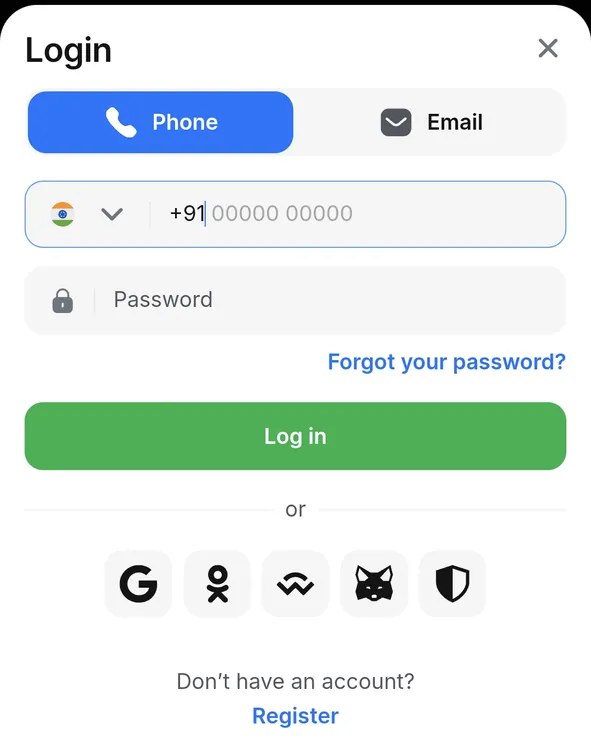
Log in. The Login sheet has two tabs, Phone and Email: enter your number or address and your password. Google and four other sign-in options sit below the Log in button, with a "Forgot your password?" link above it.
Confirm your e-mail. 1win's confirmation page says a confirmed e-mail lets you log in and withdraw funds safely. Details not yet confirmed show "Verification required" in Settings.
If the 1win app is not working
| Problem | Check | Next step |
|---|---|---|
| Android says the install is not allowed | "Install unknown apps" in Settings | Allow only the browser you downloaded with, then open the file again |
| You forgot your password | The Login sheet | Tap "Forgot your password?" |
| A payment or account question | Support, in your profile | Online chat, the Telegram bot @FAQ_1win_bot, or support@1win.social |
| Settings show "Verification required" | Your phone number or e-mail | Confirm it there; to change details you have confirmed, Settings says to contact 1win |
If a page asks you to pay, deposit or install another app to fix access, stop. A deposit never fixes a login or an app problem.
Using the 1win app
| Feature | What it does |
|---|---|
| Bet slip | Singles, multiples and series, a MAX stake button, and a Bet code field to view a bet from its code |
| Live | A score view and a TV button, with live video on some matches |
| Cash out | Open bets in Bet history can show a Cash out button |
| Accumulator bonus | The slip says how many more selections at 1.25 or higher earn the 7% win bonus |
| Points | 200 for installing the Android app and 100 for allowing notifications, 1win's offers say |
| Languages | Hindi, Hinglish, Marathi, Telugu and Urdu among them |
Help. Support offers an online chat, the Telegram bot @FAQ_1win_bot and the e-mail address support@1win.social.
Money in brief. 1win's rupee cashier takes UPI, PhonePe, PayTm, GPay and iCash from ₹300. Before you can withdraw, 1win's terms ask you to bet each deposit once in full; they give 1 to 60 minutes for up to USD 50 and 5 days from USD 50, and the bank or payment system can add delays. The welcome package is a casino bonus; for cricket, the Multiple bet bonus adds 7% to 15% to the winnings when at least five selections at odds of 1.25 or higher win and none loses. Our 1win review has the limits and the rules. For other sites that take UPI, see our UPI betting sites.
How we checked this guide
Every screen here is from 1win's Android app and its mobile site, captured on 21 October 2026. 1win's own install steps are credited to 1win.
1win app: questions and answers
How do I download the 1win APK?
On 1win's site, open the Install app sheet from the "1win for Android" card, choose Android and tap Download. If Android asks, allow installs for your browser in "Install unknown apps", then tap Install.
Is the 1win APK safe to install?
Get it only from 1win's own site. Give the install permission to your browser alone. Never share a one-time code with anyone.
How do I get 1win on an iPhone?
Open 1win's site in Safari, tap Share, then Add to Home Screen and Add. That keeps the site one tap away; it is not an App Store app.
How do I log in to the 1win app?
Open Login, choose Phone or Email, then enter your number or address and your password. Google and four other sign-in options sit below the Log in button.
Is the 1win app in Hindi?
Yes. Hindi is in the app's language list, with Hinglish, Marathi, Telugu and Urdu.
Does 1win give a bonus for installing the app?
1win's site offers 200 Points for installing the Android app. On a rupee account, 1,200 Points exchange for ₹625 once you have made a deposit, and that money is wagered once before you can withdraw it.
For other bookmakers' apps, see our guide to cricket betting apps in India.
1win on your phone